What would it be like to take a blurry, old image, or just plain old photo, and transform it into something spectacular in minutes? There’s no complicated software, and years of experience in design–just a couple of clicks. This is exactly what Remaker AI is: a tool that claims to be able to recreate every image with artificial intelligence.
Doesn’t sound impressive, does it? But is it really that good, or is it simply another AI tool that’s been hyped up?
What is Remaker AI?
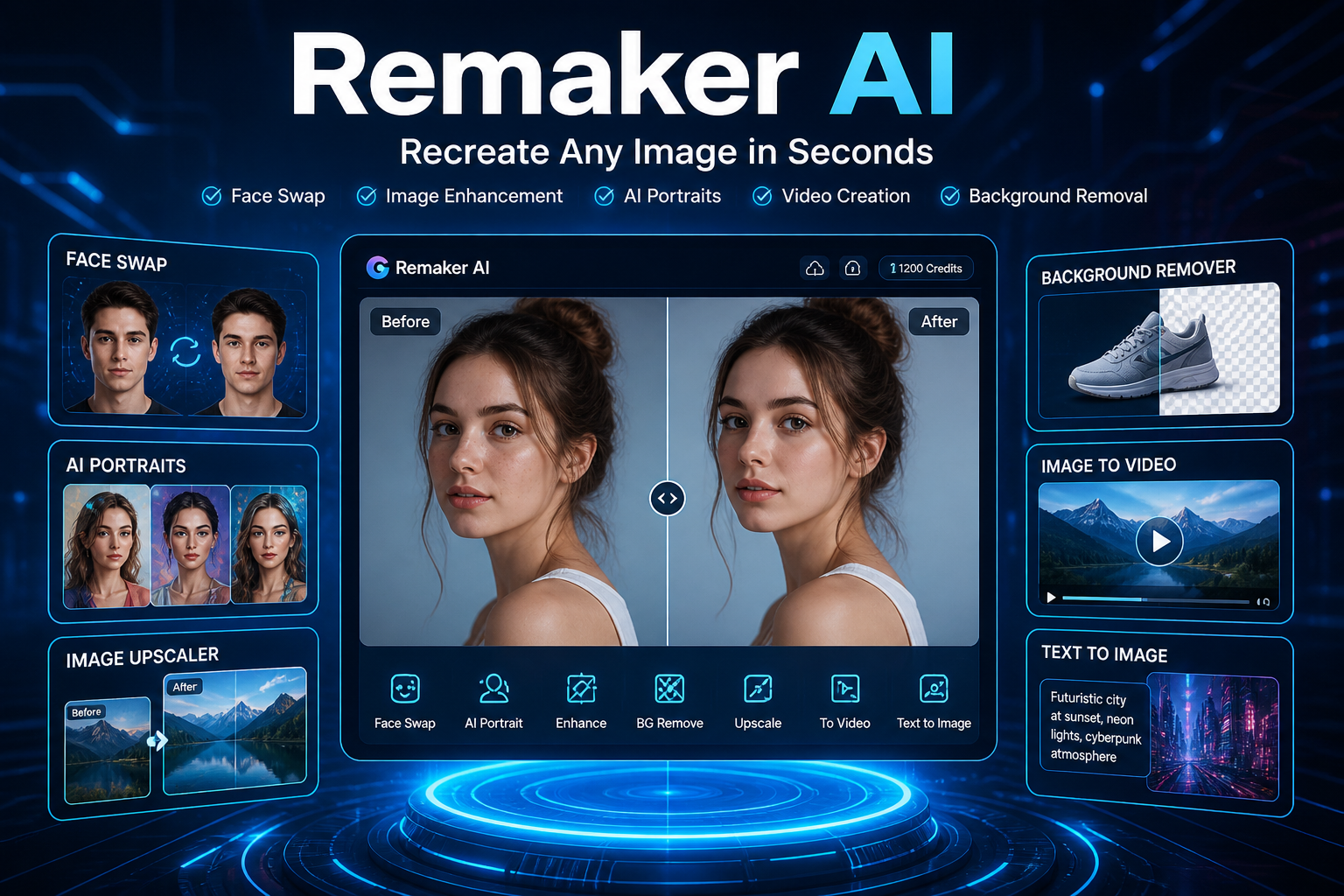
Remaker AI is an AI-powered tool for content creation that can alter the way users edit videos and images. It lets users recreate, improve, and alter digital media within a matter of seconds, without needing advanced technical expertise. It doesn’t matter if you need to switch faces, increase the quality of images, or create entirely new images from the text you’ve written; Remaker AI provides an all-in-one solution.
In contrast to traditional editing software, which requires knowledge and experience, Remaker AI simplifies complex jobs by using AI and automation.
What is Remaker AI?
The Core Idea Behind Image Recreation
In its most basic form, Remaker AI is based on the promise of being able to recreate every image with artificial intelligence. It’s not just about simple editing, like changing brightness or filters. Instead, it’s about rebuilding an image from the beginning with understanding its basic nature, and then creating an enhanced or modified version that usually looks better than the first.
Imagine presenting a blurry photograph to a skilled digital photographer who cannot only fix it, but also reimagines it in a way that is realistic. This is the exact thing Remaker AI can do, but it does this task in a matter of seconds. It analyses the appearance of faces and lighting, textures, and composition, and then reconstructs the images by using the honed AI models.
This is why it’s commonly employed for:
- Enhancing images with low-quality
- Face swapping seamlessly
- Recreate backgrounds
- Making completely new images by reusing existing images
The idea of AI image reconstruction is what distinguishes Remaker AI from the traditional tools. Remaker AI doesn’t rely on manual adjustments. Instead, it employs pattern recognition and prediction. Instead of being stretched pixels, it makes new ones in a way that is intelligent, so that the final results look natural and not artificially edited.
For the user, this is like a breeze. Upload a photo, select one of the features, and let the system do everything else. No steep learning curve that is steep, no technical barriers, just outcomes.
Why Remaker AI Is Exploding in Popularity
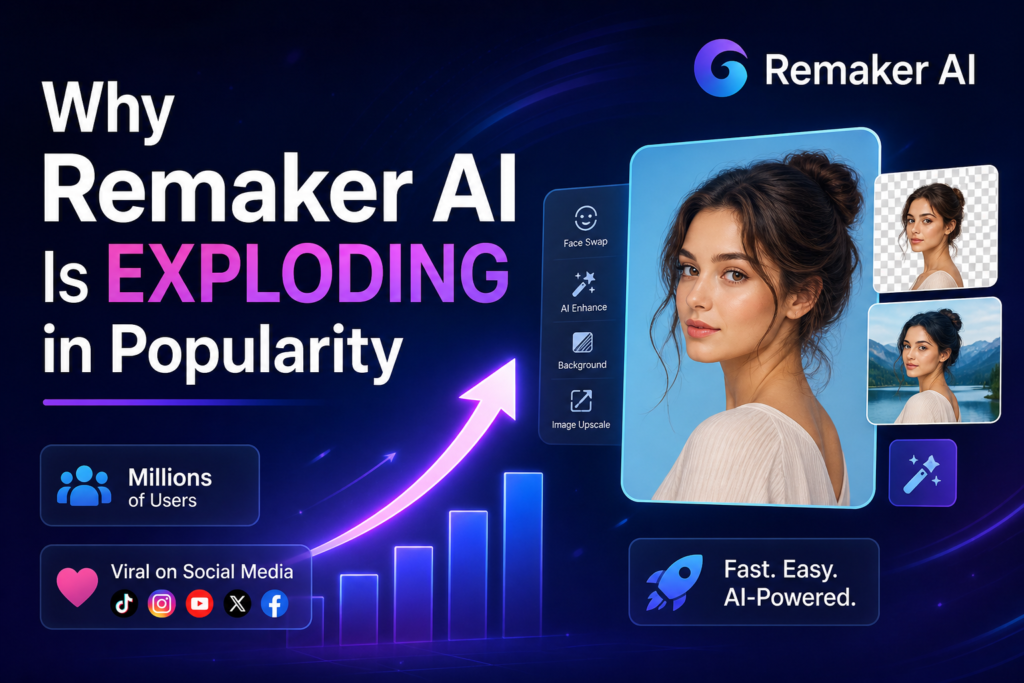
There’s a reason why tools such as Remaker AI are gaining massive recognition. The Internet today relies on images–social media, advertising, branding, content creation — everything relies on high-quality photos. The people expect results immediately.
Remaker AI is a perfect fit for this market. It has the following features:
- Speed (seconds instead of hours)
- Simple (no technical expertise required)
- Affordable (cheaper than hiring a professional)
Another reason for this is the nature of virality in transform and face swap content. It doesn’t matter if you’re putting yourself in the film or re-creating the look of a celebrity. People love to experiment. This passion for exploration fuels the growth of the organization organically.
There’s also an aspect of practicality. Marketers, companies, and online sellers require constant, high-quality images. Instead of investing thousands in editing services, they could make use of Remaker AI to achieve similar results for a fraction of the price.
In the end, it’s not an instrument; it’s a paradigm shift in the way content is produced.
How Remaker AI Works
AI Image Reconstruction Process
If you upload an image to Remaker AI, the program isn’t able to “see” a picture–it breaks it into information. Each pixel is part of a larger analysis in which the AI detects:
- Facial landmarks and faces
- Background elements
- Shadows and lighting
- Edges and texturing
After analyzing the image, the AI starts the reconstruction process. Instead of directly editing the image, it creates a fresh model of the photo based on learned patterns. This is why outputs typically appear sharper, cleaner, and more natural.
For instance, when you have a blurry image:
- Traditional tools sharpen existing pixels
- Remaker AI can create missing details by analyzing data learned
This is how editing differs from re-creating.
Technologies Powering Remaker AI
Remaker AI uses advanced technologies such as:
- Deep Learning Models (CNNs) to recognize images
- GANs (Generative Adversarial Networks) for the purpose of generating realistic
- Diffusion Models for image enhancement and creation
The systems are trained on thousands of pictures, which allows them to comprehend patterns such as:
- What kinds of faces should be viewed in different lighting conditions?
- What happens when textures are used
- Motion in videos is a key element
This is the reason why you can enjoy features such as realistic face swaps as well as high-end upscaling.
Core Features of Remaker AI
Face Swap Technology
The most admired characteristics in Remaker AI are its face-swapping capability. It lets users replace faces on videos and images with astonishing precision.
The platform allows single face swaps where one face is swapped within an image. It can also support multi-face swaps, which makes it suitable for group photographs. The most sophisticated feature is the face swapping in video, which is where the AI processes each frame of an image to generate real-looking results.
This feature is often utilized to create entertainment as well as social media content and marketing campaigns.
AI Portrait Generator
AI portrait generator lets people make professional headshots by using simple selfies. This is especially helpful for those who require images for profile photos on LinkedIn, resumes, or business sites for business.
The AI improves facial features, alters lighting, and uses various styles to produce refined photos. The result is often similar to that of professional photographers.
Image Upscaler
Images with poor quality can be an issue, particularly when used for professional reasons. Remaker AI helps with this problem by using its image enhancement.
This tool improves image resolution while keeping the details. It makes use of sophisticated algorithms to ensure that the image isn’t blurry or blurred.
Background Remover
The manual removal of backgrounds is a tedious task. Remaker AI can automate this task with excellent precision.
The tool is able to detect objects and even remove backgrounds in difficult situations, like the hair of a person or a transparent object. The user can then replace the background with a fresh background or leave it completely transparent.
Object Removal Tool
Sometimes, images have undesirable objects that spoil the overall appearance. Remaker AI lets users eliminate these unwanted objects by BSHWL@.
It fills the area naturally, making it appear as if the object wasn’t there.
Text-to-Image Generator
This feature lets users create images using written descriptions. This feature is particularly beneficial for marketers and designers who require distinctive visuals in a short time.
Users type in the information they’d like, and the AI creates an image in response to that description.
Image-to-Video Conversion
Images that are static can be transformed into animated videos by using this feature. The AI incorporates the motion and changes to make exciting video content.
This is ideal, especially for platforms like social media, where video content is more effective than images.
Step-by-Step Guide: How to Recreate any Image using Remaker AI
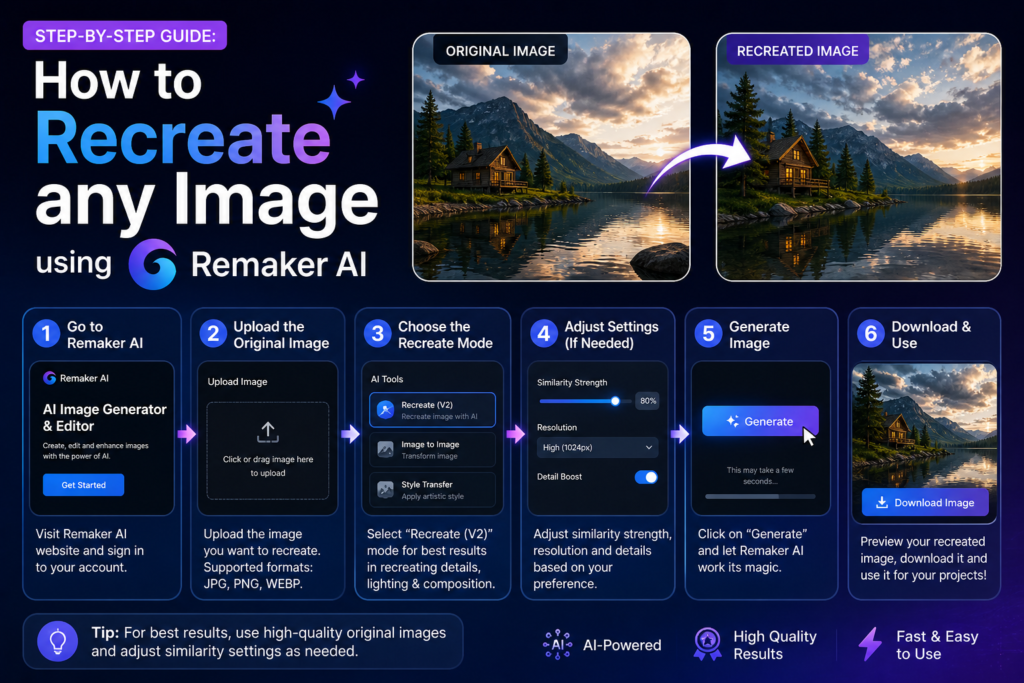
1: Upload Your Image or Video
Understanding the way Remaker AI operates does not require any technical knowledge. This is among the biggest benefits. The process starts with the upload of your images or videos to Remaker AI. Drag and drop your files straight into the platform, which makes it fast and simple. After uploading the system will immediately begin scanning your file to find out the contents.
2: AI Analyzes the Content
After uploading, after uploading, after uploading, the AI automatically analyses your file in depth. It recognizes crucial elements like faces and items, lights and backgrounds. This is vital since it allows the system to learn how to edit or create the image. All of this happens in a matter of minutes, even for high-resolution images.
3: Choose the Editing Feature
After the analysis is completed and you have completed your analysis, you’ll be presented with an array of tools to pick from. This could include face-swapping images, photo enhancement tools, background elimination, and recreation software. The interface is easy and user-friendly. Often, it shows previews to help you understand the purpose behind each tool before applying it. This makes it a breeze for those who are new to the field to begin.
4: AI Processing and Transformation
When you select the desired feature, after that, the AI will take over entirely. It processes the image or video with sophisticated algorithms and then applies the desired transformation. If it’s swapping faces or improving quality, or re-creating particulars, the system functions seamlessly behind the scenes. Based on the complexity, this process typically takes anywhere from a couple of seconds to several minutes.
5: Preview the Result
Once the processing has been completed After processing is complete, you can view the final result. This lets you see the way your video or image changed. If you notice something isn’t quite correct, then you can return and alter settings, or even try another option. This flexibility gives you greater overall control of the outcome.
6: Edit, Refine, and Customize
At this point, you are able to make further adjustments. You could modify brightness, run a Face swap, or experiment with another design. The system was designed to allow exploration, and you’ll be able to continue to improve your results until you get the results you want.
Download and Use Your Content
Once you’re happy with the final result, you can download your restored image or video in top quality. The file is now ready to be used for marketing, social media, private projects, or any other use. The whole process is quick, easy, and doesn’t require any special editing skills.
Remaker AI vs Other AI Tools
Comparison of Popular Alternatives with
It’s no secret that the AI content creation market is becoming increasingly crowded, so it’s a good idea to ask what Remaker AI really stacks up in comparison to other programs. There are plenty of options, including DeepFaceLab, Reface, Canva AI, and Runway ML, each of which comes with distinct strengths and drawbacks. Remaker AI can successfully seize its own space by balancing simplicity of use with a variety of powerful features.
To help make the process clearer, here’s a quick overview:
| Feature | Remaker AI | Canva AI | Runway ML | Reface |
| Face Swap Quality | High Realism | Limited | Advanced, but complicated | Good for fun use |
| Ease of Use | Very user-friendly for the beginner. | Easy | MtwsT (moderate the learning curve) | Very simple |
| Video Editing | Yes | Basic | Advanced | Limited |
| Image Enhancement | Strong | Strong | Advanced | Basic |
| Pricing | Affordable | Subscription | premiym (premium price) | Freemium |
What’s notable is how Remaker AI can be found in the middle, being strong enough to tackle complex projects, but easy enough for novices. Tools such as Runway ML provide advanced features; however, they usually have a more difficult learning curve. However, applications like Reface can be fun, but are restricted in terms of.
Remaker AI’s flexibility allows it to appeal to a wider public. If you’re making memes, marketing videos, or professional images, the platform can be adapted to your specific needs. It doesn’t attempt to overload you with too many possibilities, and it does not make you feel constrained.
Another important distinction is the equilibrium between control and automation. Some software tools either automate everything (leaving very little space for customization) or need excessive manual input. Remaker AI discovers a perfect balance and gives users the ability to customize their content while still benefiting from the efficiency of AI.
Remaker AI vs Human Editing
Speed and Workflow Efficiency
AI is the winner here. Manual tasks that can take hours can be completed in a matter of minutes. Batch processing makes it more efficient.
Quality and Realism Comparison
In controlled environments, AI performs extremely well. But in complicated situations (lighting angles, lighting) humans editors are superior.
Creativity and Control
Humans are awe-inspiring in their creativity. AI recognizes patterns, whereas humans process ideas and feelings.
Pricing and Credit System Explained
Free Credits and Paid Plans
Remaker AI provides free credits to novices. Paid plans rely on a credit-based system, in which each act uses credits.
Cost vs Traditional Editing
In comparison to hiring editors, Remaker AI is considerably less expensive and quicker.
Pros and Cons of Remaker AI
Pros:
- Automated and speedy
- Beginner-friendly
- Affordable
- MTDD is a platform that has all of the features
Cons:
- In complex cases, nty’j is inconsistent
- The credit system could be a source of
- Control of creativity is limited.
Best Use Cases
- Social media content
- Marketing visuals
- E-commerce product images
- Personal projects of creative expression
Limitations and Ethical Concerns
AI face swapping raises questions about privacy and misuse. Users should use the tool in a responsible manner.
Future of AI Image Recreation
AI-based tools such as Remaker AI will continue improving. Expect improved quality, speedier processing, and greater creative control.
Conclusion
Remaker AI is an incredibly powerful tool that is able to truly create images, not only edit them. Although it can’t substitute the human creative process, it significantly increases speed and access. The best approach is to combine AI efficiency with human imagination.
Latest Article: Doujen Moe: Meaning, Culture & Digital Trends
FAQs
1. What is Remaker AI photo?
Remaker AI photo is an expression that describes AI-powered software that enhances and alters images instantly. It’s possible to enhance the quality of photos and also switch faces and change backgrounds in only a couple of minutes.
2. Is Remaker AI Enhancer cost-free?
Most of the time, it is a free version, with some features. Advanced tools and higher-quality outputs may require a premium plan.
3. Do I have the option to download the Remaker AI APK premium, unlocked?
It’s not recommended. Unofficial APKs can be risky and expose your personal data. Make sure to use an authentic platform.
4. Does Remaker AI support video editing?
Yes, it supports face swapping, background adjustment, and quality enhancements made using AI automation.
5. Do you know of an existing Remaker AI app?
Remaker AI is mostly a web-based program; however, it also works with mobile browsers, and permits application access that is according to the latest versions.